eServices

Loan Payment Portal!

Making payments to your Destinations Credit Union loans just got easier.

We’re pleased to introduce our new payment portal—an easy, secure way to pay your loans using your debit card or bank account.

Want to make a payment to Destinations from another financial institution? Now you can do it in just a few clicks.

Try our NEW payment portal today!

Add Your Destinations' Cards to Your Mobile Wallet

Now, you can pay quickly and securely - with just your phone!

Add your Destinations Credit Union credit card and debit card information to your preferred mobile wallet app for a faster, easier and secure way to pay.

It’s easy to get started!

Step 1: Add your Destinations’ Credit and/or Debit cards to your Apple Pay, Google Pay, or Samsung Pay App.

Step 2: Look for the contactless symbol in-store as you check out!

Step 3: Hold your phone up to the symbol on the contactless terminal.

To use your Mobile Wallet online and in-app, look for the Apple Pay, Google Pay or Samsung Pay logo (depending on your phone) when you are ready to complete your purchase. Click to login and pay.

Remember, these purchases carry the same fraud protections as your physical card.

Apple, the Apple logo, and Apple Pay are trademarks of Apple Inc., registered in the U.S. and other countries. Google Pay is a trademark of Google LLC. Samsung Pay is a trademark of Samsung Electronics Co., Ltd. Actual experiences with mobile wallets may vary by the type of application, the device you’re using, and the merchant’s point-of-sale terminal authentication process. Some merchants may require a PIN or device number to complete your secured mobile wallet transaction.

e-Banking

No matter where you are, you have access to your Destinations’ accounts with our online banking and mobile app!

Online Banking & Bill Pay

  • Fast, free, and secure service for Destinations Credit Union members1
  • Make your life easier with 24/7 online access to several banking tasks:
  • Easily pay bills through one, convenient portal
    • Make one-time or recurring payments
    • Schedule payments in advance
    • Save money on rising postage rates and materials
    • Set up one-time or recurring transfers to other institutions
    • Ensure that payments are received on time
    • Manage all payee information through one login
  • Download to money management software
  • Save valuable time; avoid extra trips to a branch

Learn More
           
To learn more about online bill pay, watch our online demo.

Getting Started
Log in to online banking and sign up for eStatements. For more information about account authentication and internet security, read our brochure online FFIEC Consumer Guidance. Once you have enrolled in online banking, you may self-enroll in online bill pay thereafter.

1There’s never a charge for online banking services. In order for online bill payment to remain free, you must use this service to pay at least 1 bill per month.

Mobile Banking with Mobile Deposit

Wherever you go, take Destinations along with you via our free mobile banking services. Your phone is instantly transformed into a branch, complete with a wide range of banking capabilities. Check balances, make transfers, find the nearest branch or ATM, and more. Simply download the app and use your online banking credentials to register and log in1.

  • Fast, free, and secure service
  • Anytime access to banking tasks, available on the go:
    • View account balances
    • View account history/activity
    • Deposit checks through your phone
    • Search for transactions by date or amount
    • Transfer funds to loans, credit cards, or other internal accounts
    • See all accounts on which you are a joint owner
    • Use dashboard controls to customize what you see
    • Find the nearest shared branch location or surcharge-free ATM
  • Card Controls give you the ability to monitor transactions in real-time plus you can turn your card off or on
  • Available from any smartphone
  • Save valuable time; avoid extra trips to a branch


Download the app today!

Mobile Deposit

Deposit checks quickly and easily using your mobile device!

  • Free service for Destinations Credit Union members
  • Save time, avoid unnecessary trips to a branch
  • Follow the instructions on the app to easily deposit your check-in just a few quick clicks

1Must be enrolled in online banking.

Enroll in eStatements

In August 2022, paper statement charges will increase to $10/month due to cost increases and supply chain issues.

Avoid this fee by signing up for eStatements in It’s Me 247 now!

To enroll, simply complete the following steps on your computer or phone:

How to Set-Up eAlerts

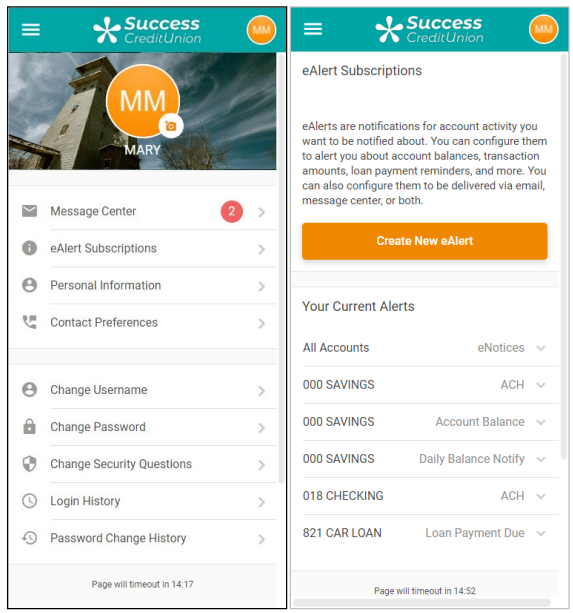
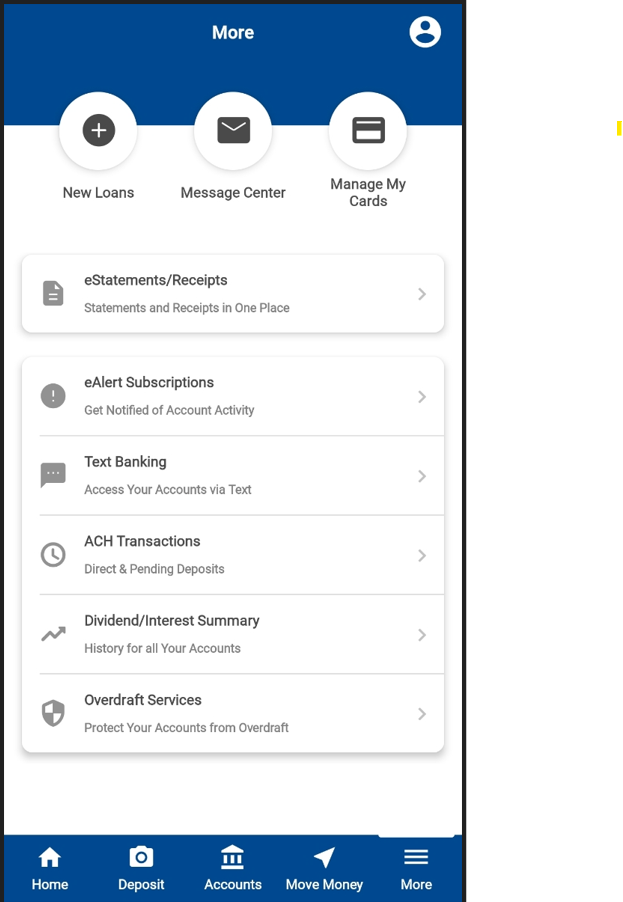
1. To access the set-up, click “eAlert Subscriptions” in the Personal and Info section from the 3 lines at the bottom right hand side of the mobile app. From here you will see a listing of the eAlerts you have already configured. To start configuring a new eAlert, you must click “Create New eAlert”.

**Please note that you MUST sign up for Text Banking in order to select to receive alerts in the form of a one-way text.**

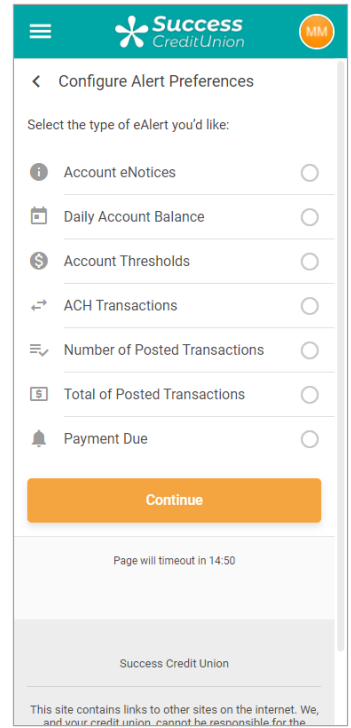
2. First, you select the type of eAlert. (Note: Email notifications require a valid email address.)
You fill out one of the following screens, depending on the alert type chosen, and then you will be presented with a confirmation window before selecting “Add Alert” to add the alert.

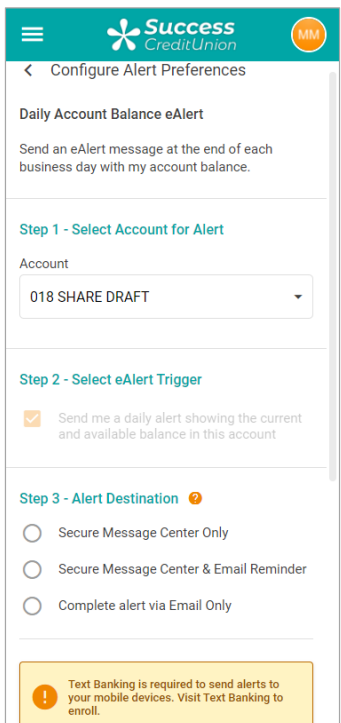
Daily Account Balance eAlert: This eAlert sends you a daily alert with the balance of the selected account.

**Please note that you MUST sign up for Text Banking in order to select to receive alerts in the form of a one-way text.**

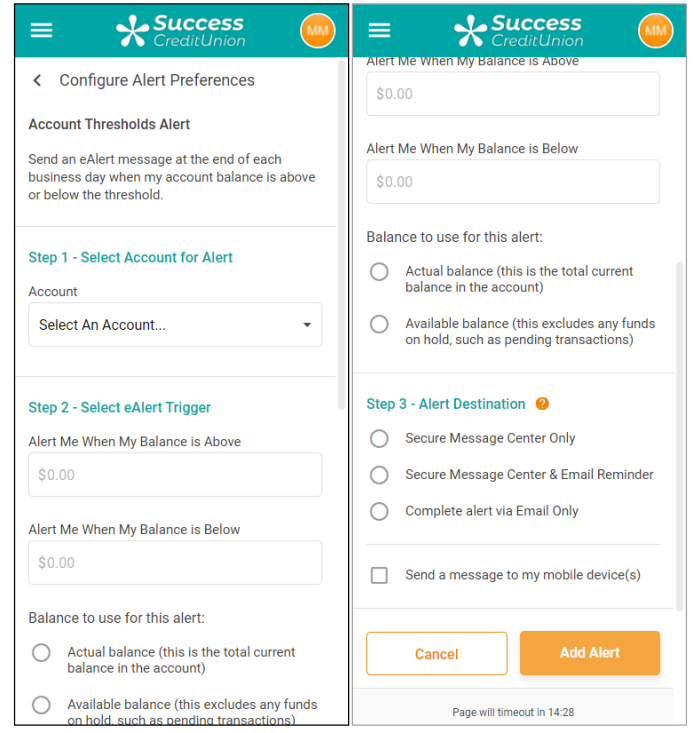
Account Threshold ACH eAlert: This alert sends you a message when the selected account is above or below the entered amount. You can receive alerts based on the available or current balance.

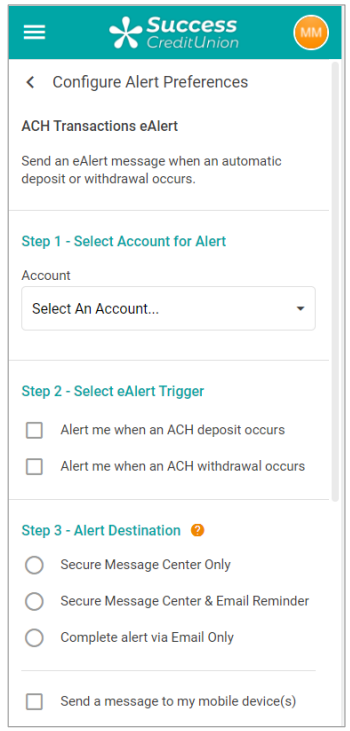
ACH Transactions: This alert sends a message when either an ACH deposit or withdrawal occurs for the selected account.

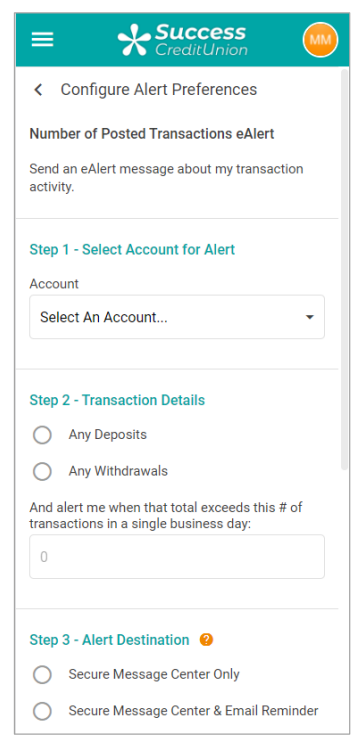
Transaction # Limit eAlert: This alert sends a message when you exceed the selected number of deposits or withdrawals for the selected account

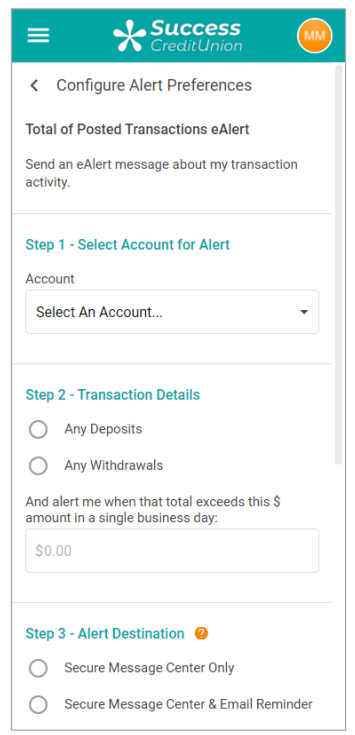
Transaction $ Limit eAlert: This alert is sent when you receive a certain number of dollars, either incoming or outgoing for the selected account.

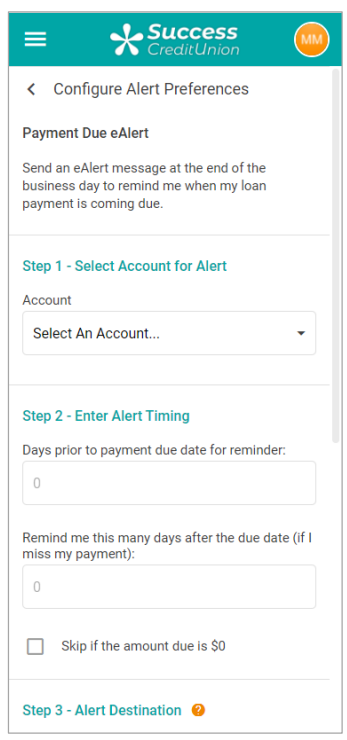
Loan Payment Due eAlert: This alert is sent when a certain number of days before the selected loan is due or a certain number of days after a payment is missed. You can elect to skip the alert if the payment is zero by checking the last box in step 2.

Text Banking

1. Select “More” from the bottom right corner of the mobile app
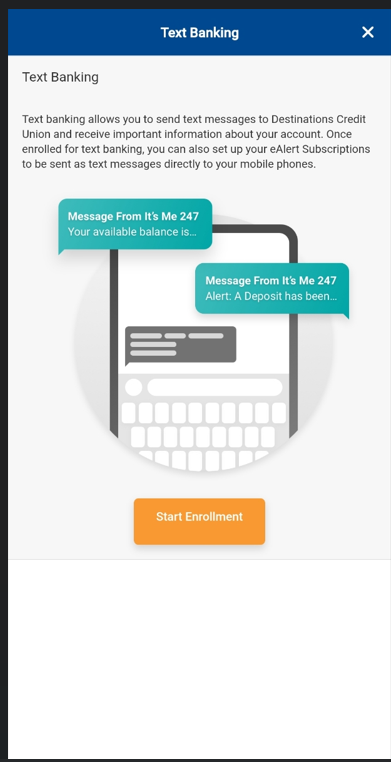
2. Select “Start Enrollment”

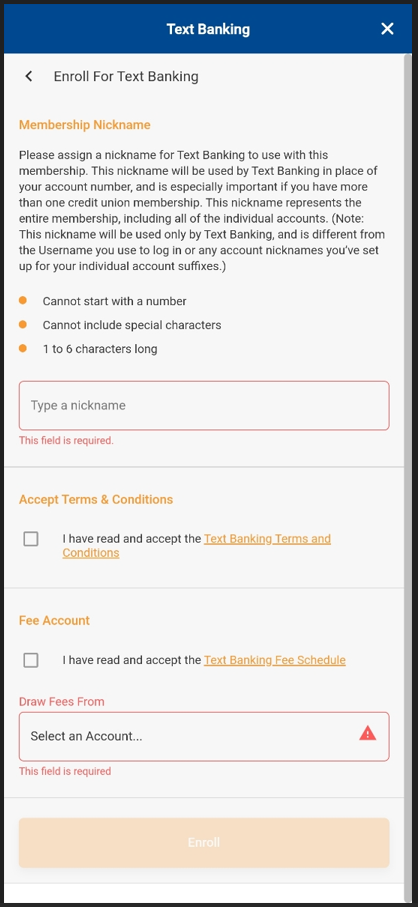
3. Complete “Nickname” field. Accept the Terms & Conditions and Fee Account. – There are no fees from Destintions Credit Union for text messages but your provider may charge. You will need to view your providers disclosure for futher information. 
4. Select “Enroll”